
Every hotel service on the guest's own phone — one QR scan away.
No app, no call to reception: guests order in a few taps and requests land on the staff screen shown below.
Virtual Front Desk puts every service Inxify supports onto the phone your guest is already holding: scanning the QR code in the room or at the lobby opens a service menu that works like an app, nothing to install. That menu is yours to define — which items, at what price, and which property turns on which service.
- Scan to open, no app to install
- Multilingual for foreign guests
- Charged straight to the room bill
- A separate service menu per property
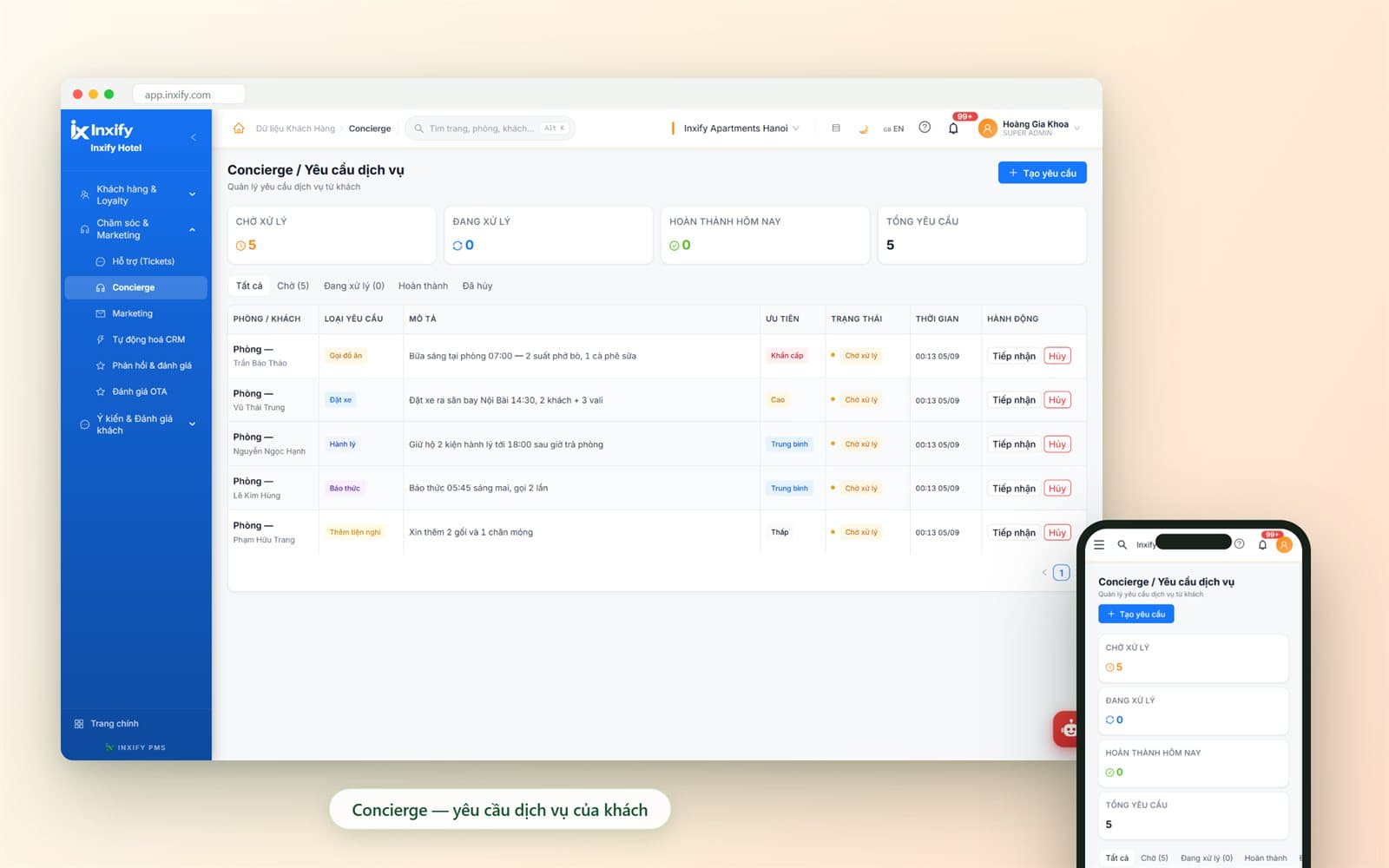
Real Inxify screenshots from a demo environment — figures shown are for illustration only. Screens are shown in Vietnamese.
Why hotels need Virtual Front Desk
When every guest request has to go through one phone line
A guest wants an extra pillow, breakfast in the room, a car to the airport — all of it goes through the front desk, and the front desk has one person on duty.
One line for every request
Before
The guest calls reception, who writes it down and tells the kitchen by word of mouth; lose the paper, lose the request.
With Inxify
Requests sent from the guest's phone reach the staff screen with type, priority and time sent — no paper in between.
Foreign guest, flustered staff
Before
Not every shift has someone who speaks the guest's language; one misheard dish changes the whole meal.
With Inxify
The guest picks a language and the content is translated; staff get a request that already names the dish and the time.
Paper menus reprinted at every change
Before
A price change, a sold-out dish or a seasonal service means reprinting the menu placed in every room.
With Inxify
Change a price or switch off a dish in the admin panel; the next scan shows the new version — no reprinting.
No idea which services actually sell
Before
Room service goes in the restaurant book, laundry in another; at month end nobody knows which property serves well.
With Inxify
Every request lives on the same system as the PMS: charged to the room and shown in each property's service report.
Built around your hotel
The service menu belongs to you, not to the software
A city hotel needs airport transfers; a resort needs laundry, spa and bicycle hire; a chain needs a different menu at each property. Virtual Front Desk does not make you share one template menu: services, prices, serving hours and the QR code for each room are all set per property. Any service missing from the list, we build just for you.
Tailored to your hotel
Service menu per property
Choose which service groups guests see — food and drink, laundry, transfers, luggage, amenities — and switch them on or off for each property.
Items, prices and serving hours
Item names, descriptions, prices and the ordering window for each service are entered by you; when something sells out, fix the menu on the spot — no reprint.
Write the menu once, translated for guests
The guest picks a language on the phone and item names and service descriptions are translated — staff never write a second menu.
Rooms, areas and QR codes
List the rooms and the lobby spots, then print a QR code for each; open more rooms and you simply print more codes.
Service menu per property
Choose which service groups guests see — food and drink, laundry, transfers, luggage, amenities — and switch them on or off for each property.
Example: The property near the airport turns on Car booking; the resort adds Laundry and Bicycle hire.
Items, prices and serving hours
Item names, descriptions, prices and the ordering window for each service are entered by you; when something sells out, fix the menu on the spot — no reprint.
Example: Breakfast takes orders 06:00–10:00; laundry handed in before 09:00 comes back the same day.
Write the menu once, translated for guests
The guest picks a language on the phone and item names and service descriptions are translated — staff never write a second menu.
Example: A guest who chooses English sees the same breakfast menu in English.
Rooms, areas and QR codes
List the rooms and the lobby spots, then print a QR code for each; open more rooms and you simply print more codes.
Example: Opening a new floor: add the rooms, print the new codes, keep the same menu.
Feature groups
From the guest's fingertip to staff hands, with no paper in between
Each group below comes with three boxes: the manual task that goes away, the mistake that gets blocked, and the part set up for your hotel.
Guests scan & order
Guests order on their own phone, no call to the front desk
Feature group · Guests scan & order
Guests order on their own phone, no call to the front desk
- Scan to open, no app to install
- A service grid that works like an app
- Cart and confirmation in a few taps
A QR code in the room or at the lobby opens the hotel's service grid right in the phone's browser — it looks like an app but nothing is installed. Guests choose, confirm and follow the status of their own request.
Key features
Scan to open, no app to install
The guest opens the camera, scans the code in the room and lands straight on the service menu in the browser; no download, no account to create.
A service grid that works like an app
Food and drink, laundry, transfers, luggage, wake-up calls, extra amenities and feedback are laid out as tiles — the guest taps the group they need.
Cart and confirmation in a few taps
The guest picks items, quantity and a preferred time, then confirms; the request is already tied to their room.
Request status tracking
The guest sees whether their request is waiting, in progress or done right on the phone, without calling down to ask.
Multilingual
The guest picks a language and the service content is translated — foreign guests order exactly what they want without a staff interpreter.
Feedback during the stay
Guests comment on the room or the service while they are still in the hotel; feedback lands on the same system as other requests so staff can act early.
Less work
- No more answering the phone and writing down each request
- No more paper menus printed for every room
Fewer errors
- Requests cannot be misheard as the wrong room or the wrong time
- Foreign guests no longer order the wrong dish because of language
Tailored to your hotel
Which service groups guests see and their order on the grid — switched on per property; the menu is written once and translated when the guest changes language.
Staff receive & handle
Requests land on one screen, sorted by priority
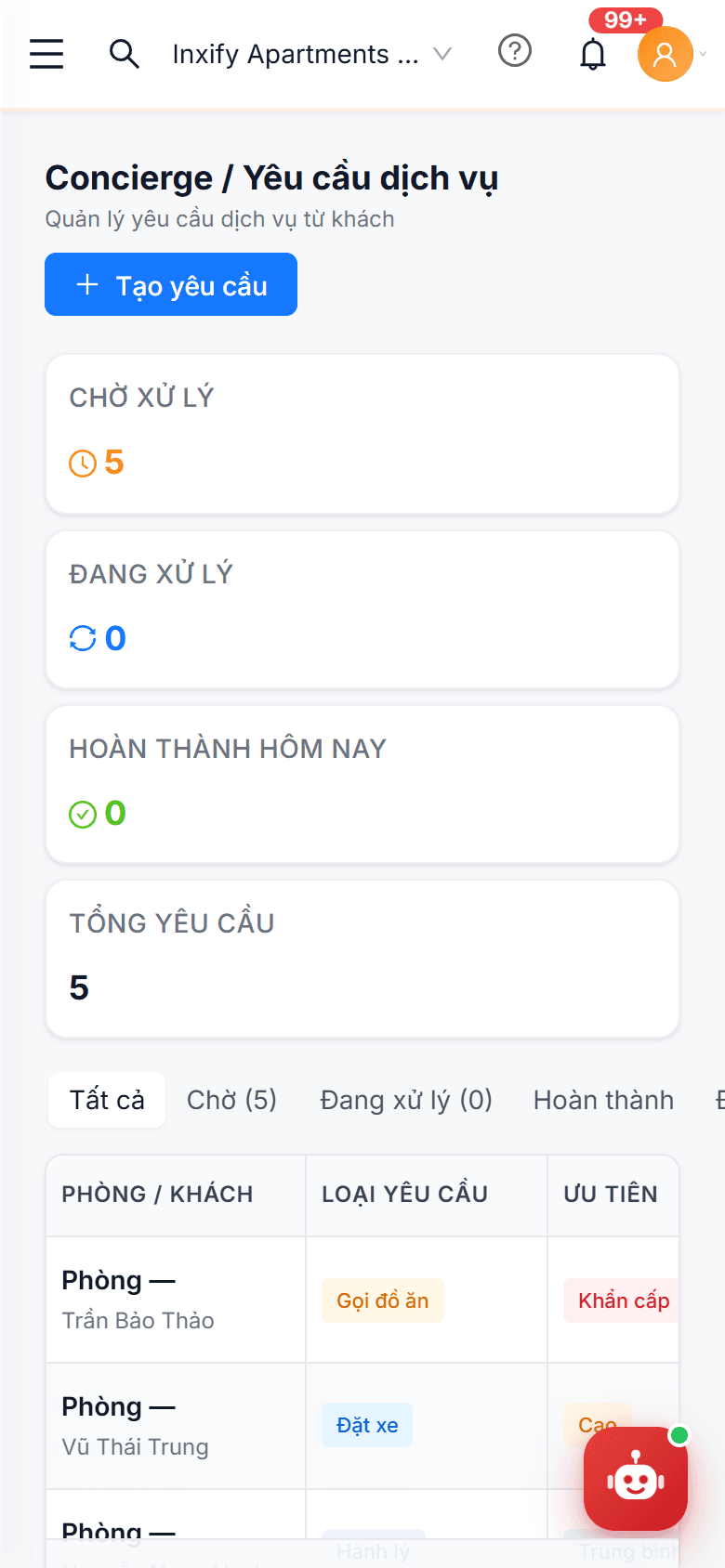
Every request a guest sends appears on the staff Virtual Front Desk / Service requests screen — on the front-desk computer or on a phone while walking the floors — with request type, description, priority and time sent. Tap Accept and the work begins.
Key features
Real-time request board
Each row is one request: room and guest name, type (Food order, Car booking, Luggage, Wake-up call, Extra amenities), the guest's note and the time sent.
Priority from Urgent to Low
Every request carries a level — Urgent, High, Medium or Low — so the shift knows what comes first; a 07:00 breakfast is not queued behind a request for extra pillows.
Accept / Cancel
Staff tap Accept to take the job; a duplicate request or a guest who changed their mind gets Cancel — the status changes on the guest's phone at once.
Pending → In progress → Completed
Four cards at the top count requests waiting, in progress, completed today and total; filter tabs show the shift what is still open.
Create a request on the guest's behalf
When a guest phones or asks at the desk, staff tap Create request to put it on the same board — no request lives outside the system.
Runs on the staff phone
The same screen, condensed for a phone: housekeeping or luggage staff accept and update requests while on the floor, without returning to the desk.
Less work
- No more running to tell the kitchen, housekeeping or the driver
- No more calling the guest back because the note was incomplete
Fewer errors
- Requests are not lost at shift change — they stay in the Pending tab
- Urgent work is not queued behind routine work
Tailored to your hotel
Which property handles which request types — kitchen, cars, luggage — is switched on per property; a property with no restaurant shows no Food order tile to its guests.
The illustration is the staff-side screen, mobile version; the guest's QR screen is shown live in the demo.
Room billing & administration
Charges reach the room bill, the menu edits itself — no waiting
Feature group · Room billing & administration
Charges reach the room bill, the menu edits itself — no waiting
- Charge to the room
- Service report per property
- Direct data export
Virtual Front Desk runs on the same platform as Inxify PMS: a completed request with a price goes onto the guest's room bill. The service menu is updated by the property manager in the admin panel — no request to the vendor, no waiting for a developer.
Key features
Charge to the room
Once breakfast, laundry or a transfer is completed, the charge sits on the room bill in the PMS; reception does not retype it from a paper slip.
Service report per property
Request counts, service types and service revenue for each property on one report — compare one property with another.
Direct data export
Request lists and service revenue export straight to a spreadsheet for reconciling with the kitchen or the transport company.
Edit menu, prices and opening hours
Add items, change prices and descriptions, set the ordering window for each service — the next scan shows the new version, nothing to reprint.
Add rooms, print QR codes
Open a new floor, add rooms or a lobby spot: add them to the list, then export a QR code for each location to print and place.
Switch services on / off per property
One base menu for the whole chain, and each property turns on what it has: a property with no restaurant turns off Food order and its guests never see the tile.
Less work
- No retyping of service slips into the room bill
- No reprinting the menu at every price change or sold-out dish
- No sending menu edits to the vendor and waiting
Fewer errors
- No more used services forgotten at check-out
- Guests no longer see old prices or dropped items on a paper menu
- Guests never see a service the property does not offer
Tailored to your hotel
Which properties use their own menu and which follow the chain template — switched on per property; service lines on the room bill and in reports use the exact menu you defined, no renaming.
Room charging goes through Inxify PMS on the same platform; deeper financial reporting (Accounting & Finance) is developed on request.
From QR code to room bill
How one room-service breakfast travels through Inxify
The most familiar example — and the one most easily lost when it still runs on a desk phone and a slip of paper.
Evening — the guest scans the code in the room
The guest opens the camera, scans the QR code on the desk, picks a language and opens the Food & drink tile.
Pick the dishes, the time, confirm
The guest picks beef pho and a coffee, notes the delivery time and confirms — the request is already tied to the room number.
The desk accepts, the kitchen starts
The request appears in the Pending tab with its priority; staff tap Accept and the guest sees the status change on their phone.
Morning — delivered, marked complete
Staff bring breakfast up and mark it complete; the charge goes onto the room bill in the PMS.
Check-out — the bill is already done
The guest checks out with breakfast already on the bill; the CRM profile records the habit and the service report gains one more order.
What is in Virtual Front Desk
Service groups for guests, request types for staff
Guest-side service groups are switched on per property; staff-side request types are what arrives on the reception screen.
Guest-side service groups
Request types on the staff screen
Developed on request
Same platform as the PMS
Not a separate piece of software to be wired in: Virtual Front Desk lives inside the Inxify platform, with the same accounts and the same room and guest data.
In the browser, no app store
Guests use it right in the phone's browser — no download, no waiting for updates; the hotel never has to talk a guest into installing anything.
Works with the rest of Inxify
Virtual Front Desk is the guest's front door — the rest connects behind it
A guest request does not stop at the staff screen: the money goes to the PMS, the habit to the CRM, the serving shift to HR.
Inxify PMS
Priced requests go straight onto the room bill; reception checks the guest out with every charge already in place.
See detailsInxify CRM
Every service a guest uses is saved to their profile as a habit — the basis for offers and care on the next stay.
See detailsInxify HR
Which shift and which person served each request is recorded — the service history sits with the employee record in Inxify HR.
See detailsScan a QR code on your own service menu
In the free demo we build your hotel's service menu — the right items, prices and languages — so you can scan, place a test order and watch the request reach the staff screen and land on the room bill.