
The whole hotel on one screen, built around how you already operate.
Less manual work at the desk, fewer cash discrepancies, and the owner sees today's numbers as they happen.
Inxify PMS is the core of the Inxify platform: bookings, check-in and check-out, housekeeping, shift handover and reports on one data source; add the Inventory module when you need it. The core comes with every plan, while floors, room types, pricing, permissions and the handover sheet are set up to match your hotel.
- Core modules in every plan
- Add-on modules when needed
- Cloud or On-Premise
- Runs on desktop and phone
- Tailored on request
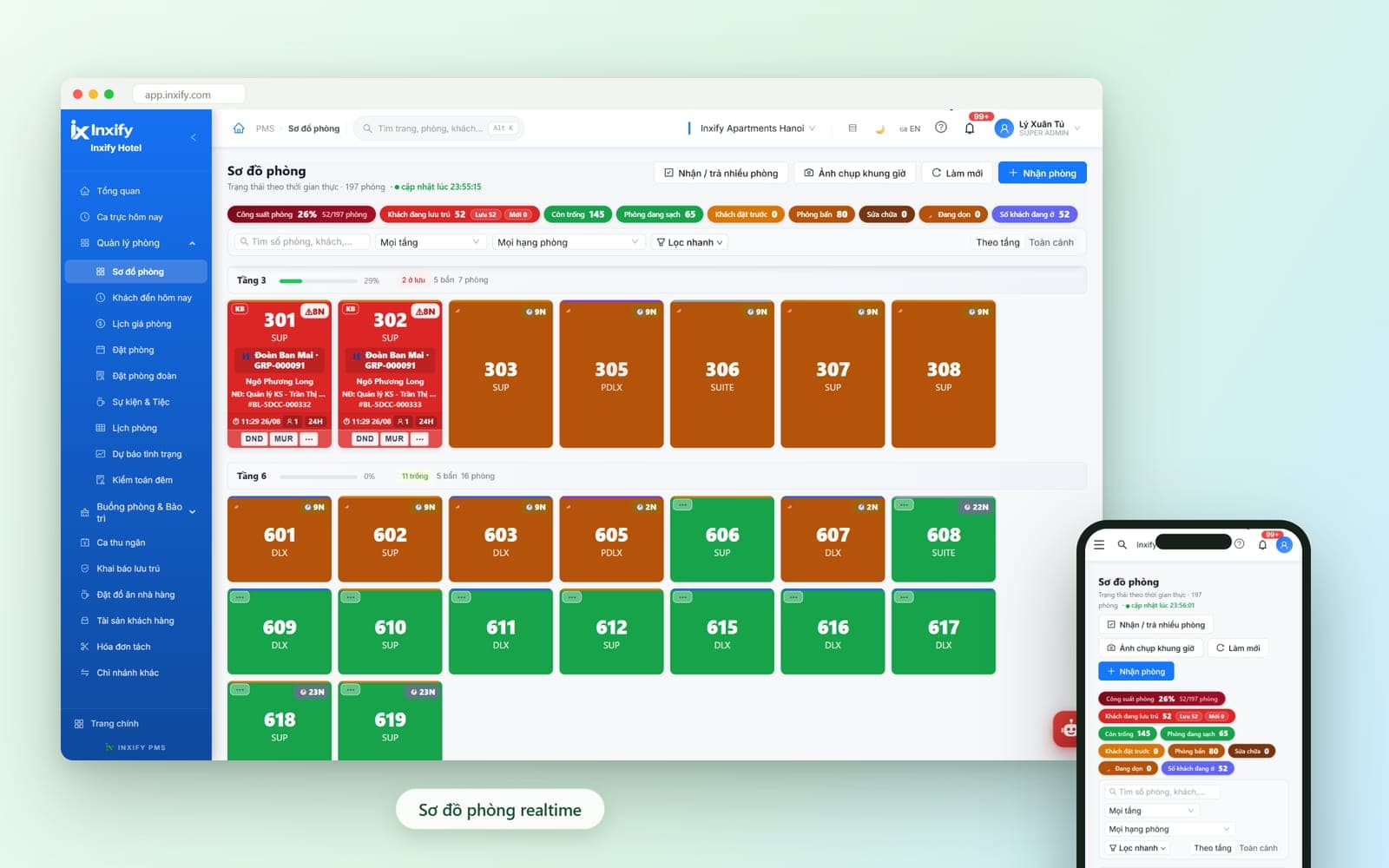
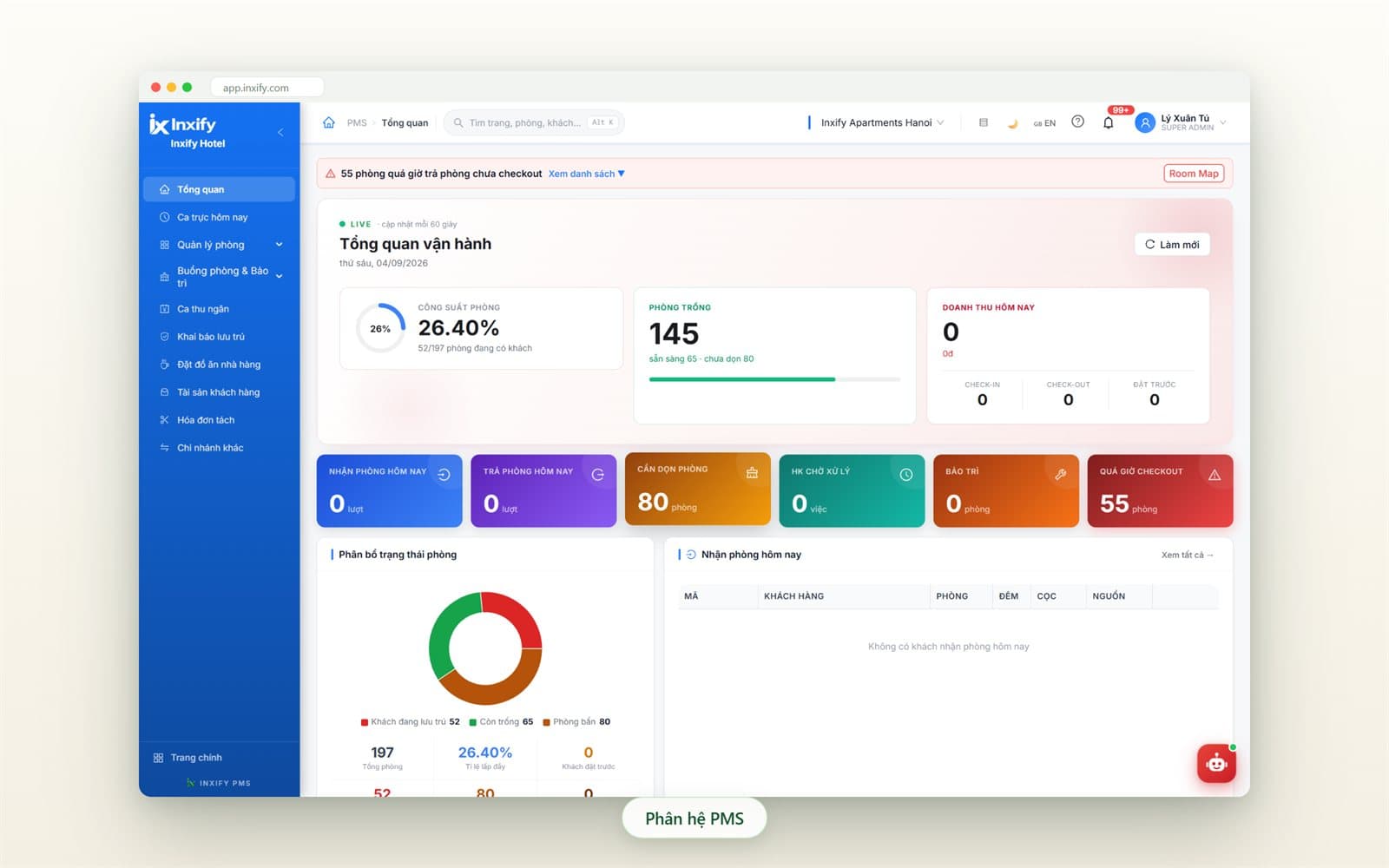
Real Inxify screenshots from a demo environment — figures shown are for illustration only. Screens are shown in Vietnamese.
Why hotel owners look for a PMS
Errors start with the work still done by hand
Hotels are not short of people — they are short of one place where every shift sees the same number. The situations below are the most common reasons owners go looking for software.
Two shifts, one room, two guests
Before
Bookings in a notebook or spreadsheet; the next shift cannot see the last one's notes, so a clash shows in the lobby.
With Inxify
Every booking lands on one room calendar; overlaps show up before the arrival date, not on it.
Rates depend on who is on duty
Before
Night, hourly and surcharge rates — each shift remembers its own; at month end nobody knows why revenue fell.
With Inxify
Pricing rules are entered once and every shift applies the same rate; who changed a rate, and when, is in the log.
Handover on a slip of paper
Before
At shift end the cashier adds up receipts by hand, cash mixed with transfers, guest balances jotted in the margin.
With Inxify
The handover sheet calculates itself for the shift hours; credit items get their own column; both shifts see one number.
Yesterday's numbers
Before
Revenue and occupancy are reported at day's end; the owner reads them next morning — today runs on yesterday's numbers.
With Inxify
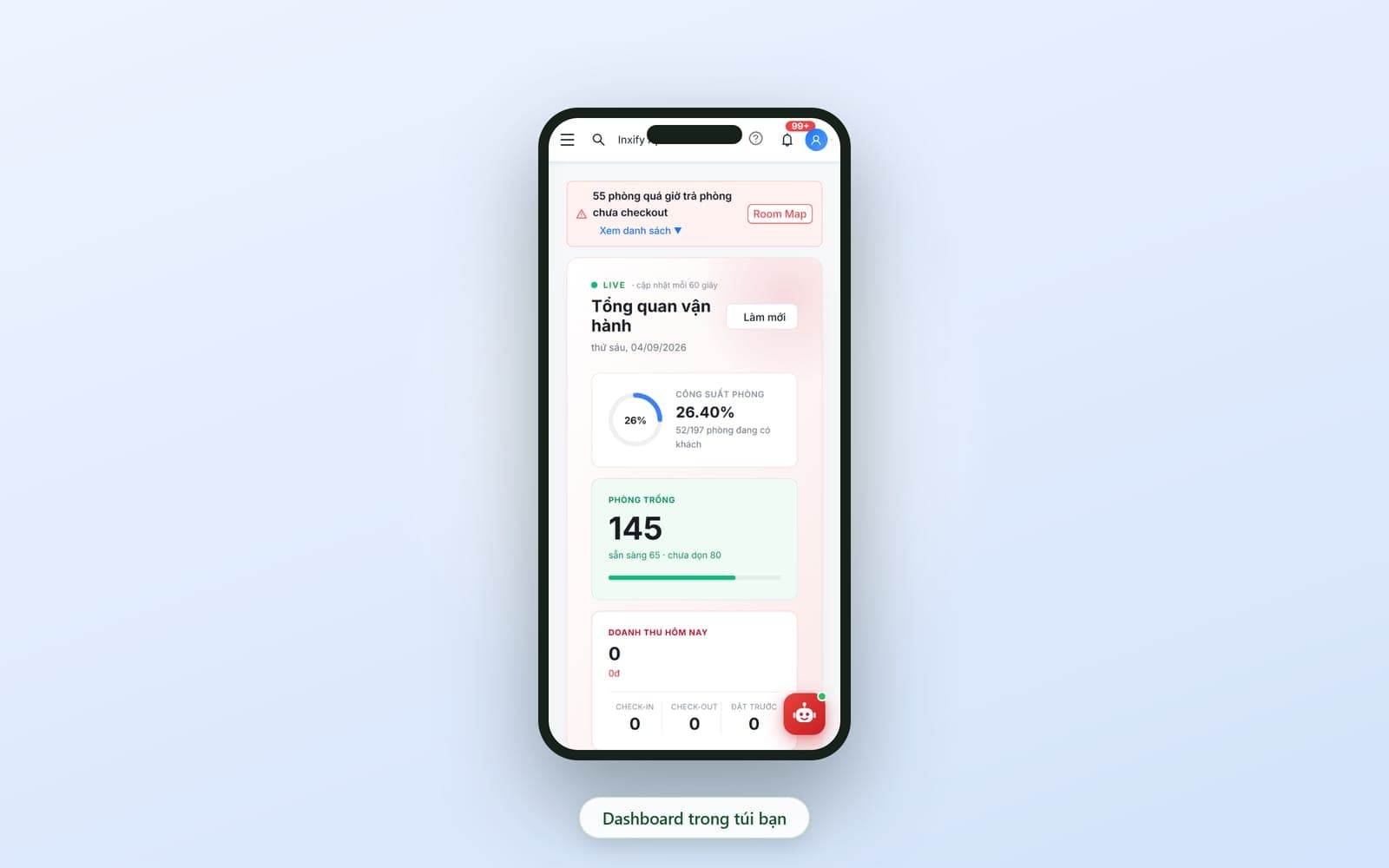
The overview updates continuously; the owner opens a phone, sees live numbers, and one tap reaches the transaction.
The focus of Inxify PMS
Built around your hotel, not a template
No two hotels run the same way: one sells by the hour, another by the night; one person covers both desk and cashier here, every role is separate there; one has a sauna and a meeting room, another only bedrooms. The areas below are configured to match how you already operate, right at setup. Whatever is not there yet, we build for you.
137
tweaks and feature requests
completed within 48 hours for one chain customer — tailoring is what the system was built for.
A room map that matches your building
Number of floors, rooms per floor, room types and their names set exactly as you sell them; view by floor or all at once, whichever the shift prefers.
Example: A building with no 13th floor; Superior, Deluxe and Suite named the way you already call them.
Pricing the way you sell
By night, by hour, extra hours, surcharges; rates by season, room type, channel and per company or agent — entered once, so the desk never has to remember.
Example: An hourly day stay is priced unlike an overnight; this agent prepays, that company pays at the desk.
Permissions that follow your real org chart
Who may book, change rates, give discounts, void receipts or view reports — set per position and per property.
Example: Small hotel: one person is both desk and cashier; chain: only the shift manager approves discounts.
A handover sheet with your own line items
Shift hours, the income and expense lines and the payment methods used at handover — what you have appears, what you do not have does not.
Example: Add Sauna, Pool or Meeting room lines if you have them; drop the e-wallet column if you don't.
Feature groups
Each group replaces a manual task and blocks one kind of error
From the front desk up to housekeeping, down to the storeroom, on to cash-flow reports and the system log. In each group, the Less work and Fewer errors boxes say plainly what you gain; the Tailored box says which part is set up around your hotel.
Front Desk & Operations
Book, check in and check out on one screen — every shift sees the same
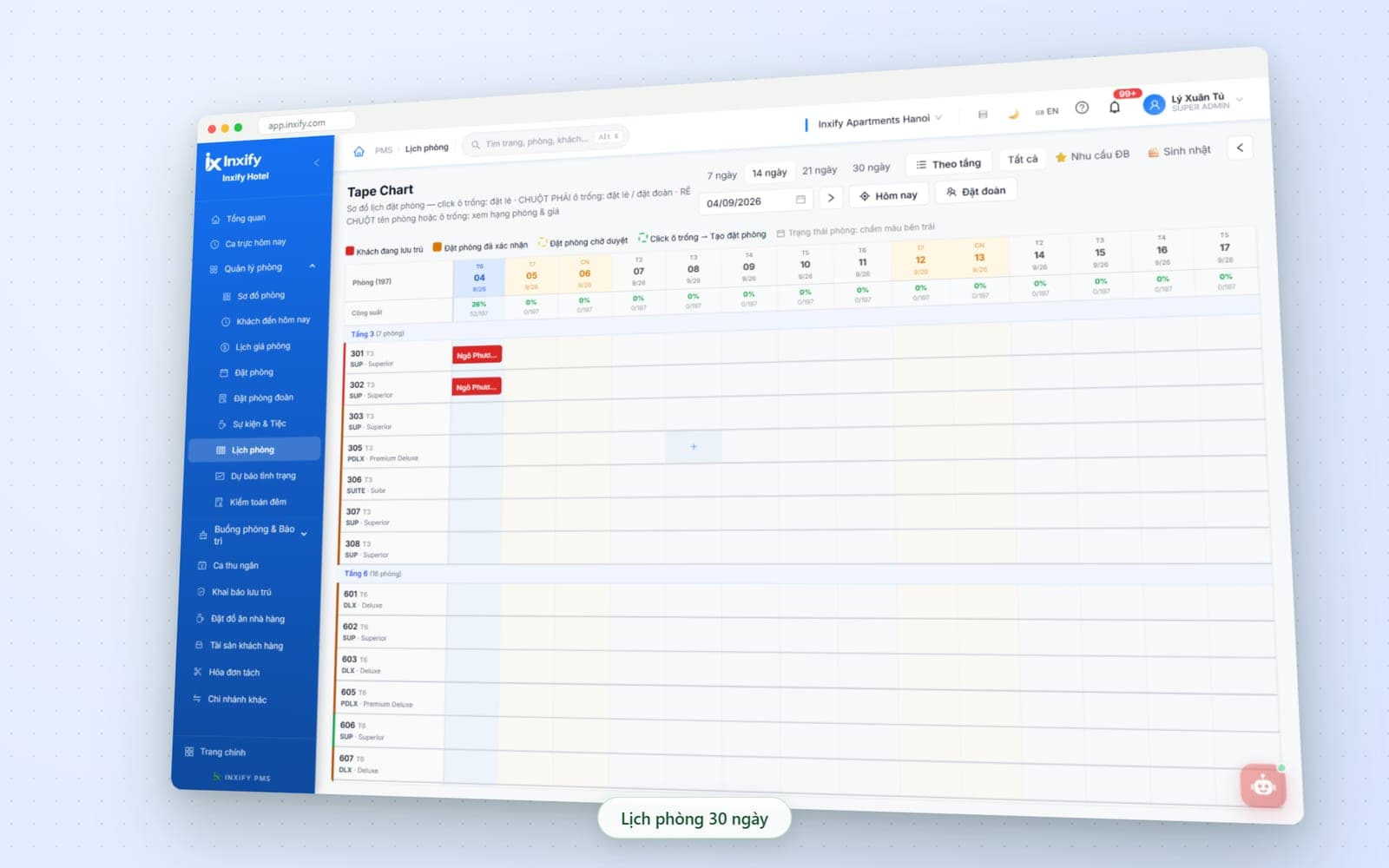
The room map and calendar share one source: put a booking on the calendar and that room changes colour on the map. Today's arrivals, cashier shifts, guest registration and night audit sit on the same menu bar — no juggling several programs.
Key features
Room map
Rooms grouped by floor and coloured by status — occupied, dirty, vacant, under repair; each card shows room type, guest name, group and check-in time. Tap a room to check in, check out or move.
Room calendar
Every booking on one calendar by room and date: click an empty cell for a single booking, right-click for a group, hover to see room type and rate; birthdays and special requests are flagged.
Multi-room check-in / check-out
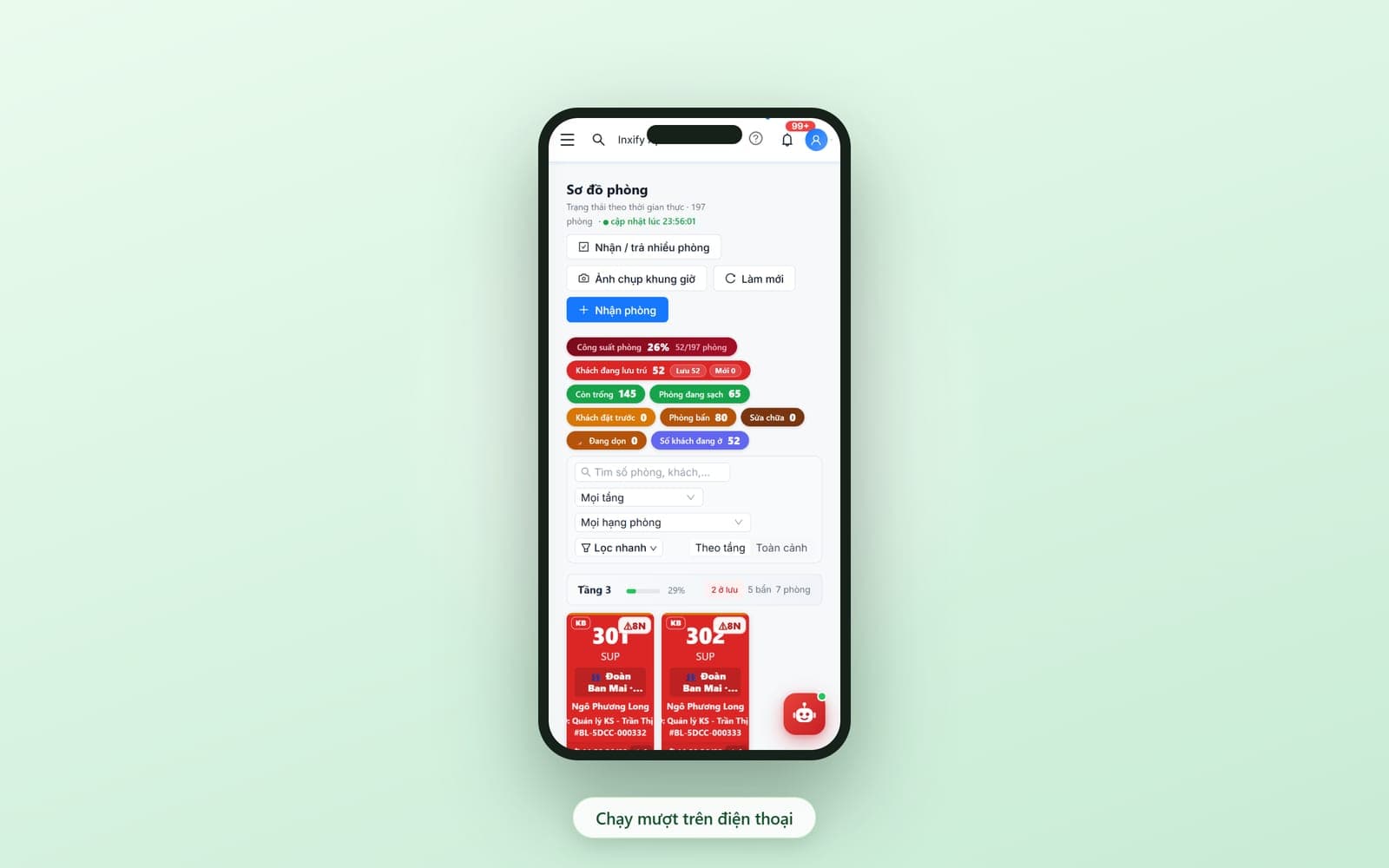
When a group arrives together, select several rooms and check them in at once; staff walking the floors open the room map on a phone and work exactly as on the desktop.
Cashier shifts
Each shift has its own hours; money taken in the shift, guest balances and receipts and payment vouchers gather in one place for handover — details in the Reports & Cash Flow group below.
Guest registration & Night audit
Guest registration pulls in the details of guests already checked in; the night audit closes the day so tomorrow starts from clean numbers.
Agent channels & commission
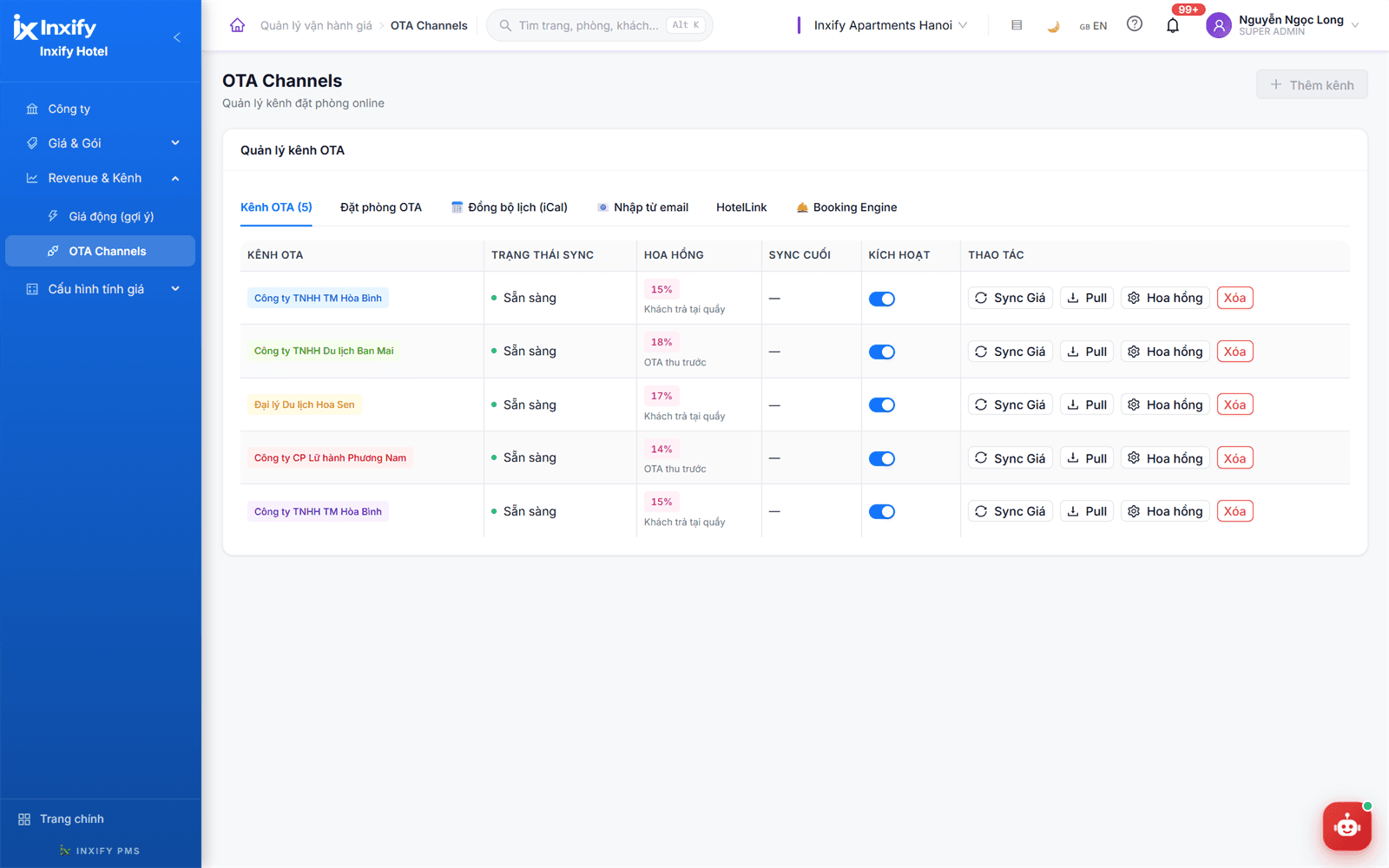
Agents and travel companies entered once with commission and payment mode — paid at the desk or prepaid. iCal, email import, HotelLink and Booking Engine tabs link to outside systems on request.
Less work
- No flipping through a notebook or spreadsheet to tell a guest whether a room is free
- No month-end agent commission in Excel — commission is entered once per channel
- No retyping guest details for registration
Fewer errors
- Two bookings on the same room cannot slip past the calendar
- A pending booking is not sold as a confirmed one
- Commission is neither forgotten nor counted twice
Tailored to your hotel
Default calendar window, view by floor or all at once, room type names, the channel list and each channel's commission — set the way your hotel sells rooms.
API connections to outside distribution systems (for example HotelLink) are developed on request for each hotel.
More screens in this group
Housekeeping & Maintenance
Desk and housekeeping share one board, without calling each other
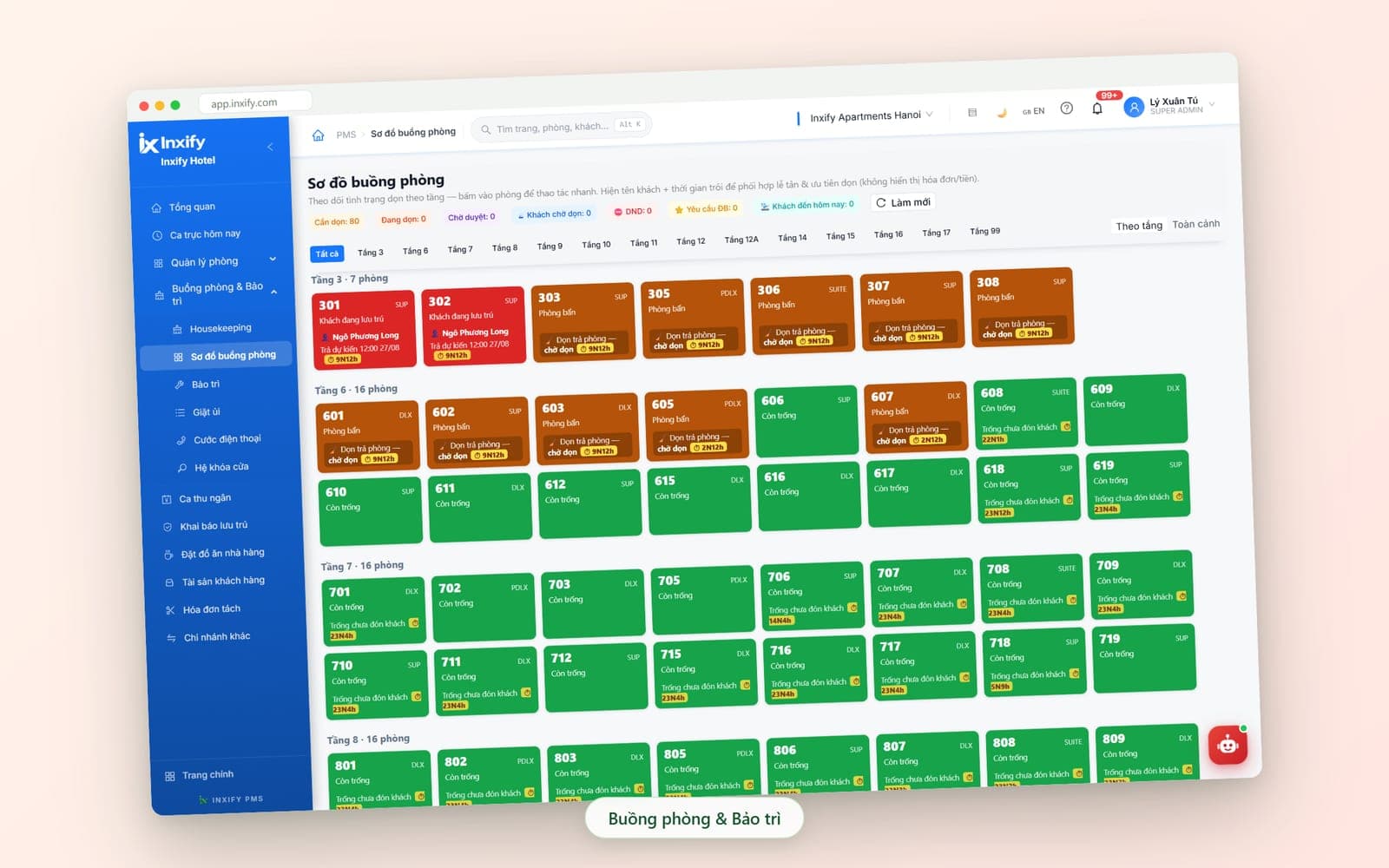
A guest checks out and the room moves to waiting-for-cleaning on the housekeeping map, with the time it has waited, so the head housekeeper knows what to do first. Housekeeping sees the guest name and expected departure — never the invoice or money.
Key features
Housekeeping map
Track cleaning status floor by floor and tap a room for quick actions. Rooms with a waiting guest, do-not-disturb rooms and special requests are counted separately at the top of the screen.
Housekeeping
The shift's cleaning list: departure rooms to turn over, occupied rooms for stay-over cleaning — today's arrivals and waiting time visible to pick what comes first; marking done updates the desk too.
Maintenance
Rooms under repair are marked separately on the map so the desk never assigns a guest to one by mistake; fault reports and repair tracking sit in the same group as housekeeping.
Laundry
Guest laundry is recorded by room right inside the housekeeping group — no more paper slips travelling from the floor down to the desk.
Door locks
The door-lock connection sits in the same group as housekeeping and maintenance, set up on request for each hotel.
Less work
- No running upstairs or radioing to ask whether a room is done
- No handwritten list of rooms to clean at the start of each shift
Fewer errors
- A room that is not yet cleaned is never sold to an arriving guest
- The room waiting longest rises to the top — it is not forgotten overnight
- Housekeeping never sees a guest's invoice or money
Tailored to your hotel
Which floors have their own cleaning team, priority levels, what guest information housekeeping can see — set the way you assign work.
Add the Housekeeping Mobile module so room attendants pick up tasks and mark them done right on their phone.
Inventory
Goods in and out recorded as they happen, no month-end recount
Feature group · Inventory
Goods in and out recorded as they happen, no month-end recount
- Item catalogue & stock on hand
- Goods-in / goods-out slips
- Reconciliation with restaurant and services
Drinks, room supplies, restaurant food — every delivery in and every issue out is a slip in the system, so stock has something to reconcile against instead of a month-end recount.
Key features
Item catalogue & stock on hand
Set up the item catalogue with your hotel's own groups and units of measure; stock on hand is shown per item.
Goods-in / goods-out slips
Every delivery in and every issue out is a slip in the system — who created it, and when, is in the activity log.
Reconciliation with restaurant and services
Drinks and food sold in the restaurant or charged to a room are reconciled against what left the storeroom — stock figures and sales figures sit in one place to compare.
In / out / on-hand report & Excel export
Goods in, goods out and stock on hand per item; every table exports straight to Excel for the accountant to reconcile.
Less work
- No adding up delivery and issue slips by hand at month end to get stock on hand
- No flipping through the stock book just to see what is left
Fewer errors
- Goods issued without a slip show up as a discrepancy at reconciliation
- Stock figures and restaurant sales no longer live in two separate books
Tailored to your hotel
Item groups, units of measure and who may create goods-in and goods-out slips — set the way your hotel runs its storeroom.
Inventory is an add-on module — added when needed; it links to Restaurant POS and the multi-hotel restaurant module when the hotel has a restaurant.
Reports & Cash Flow
Cash closed per shift, revenue right down to the receipt
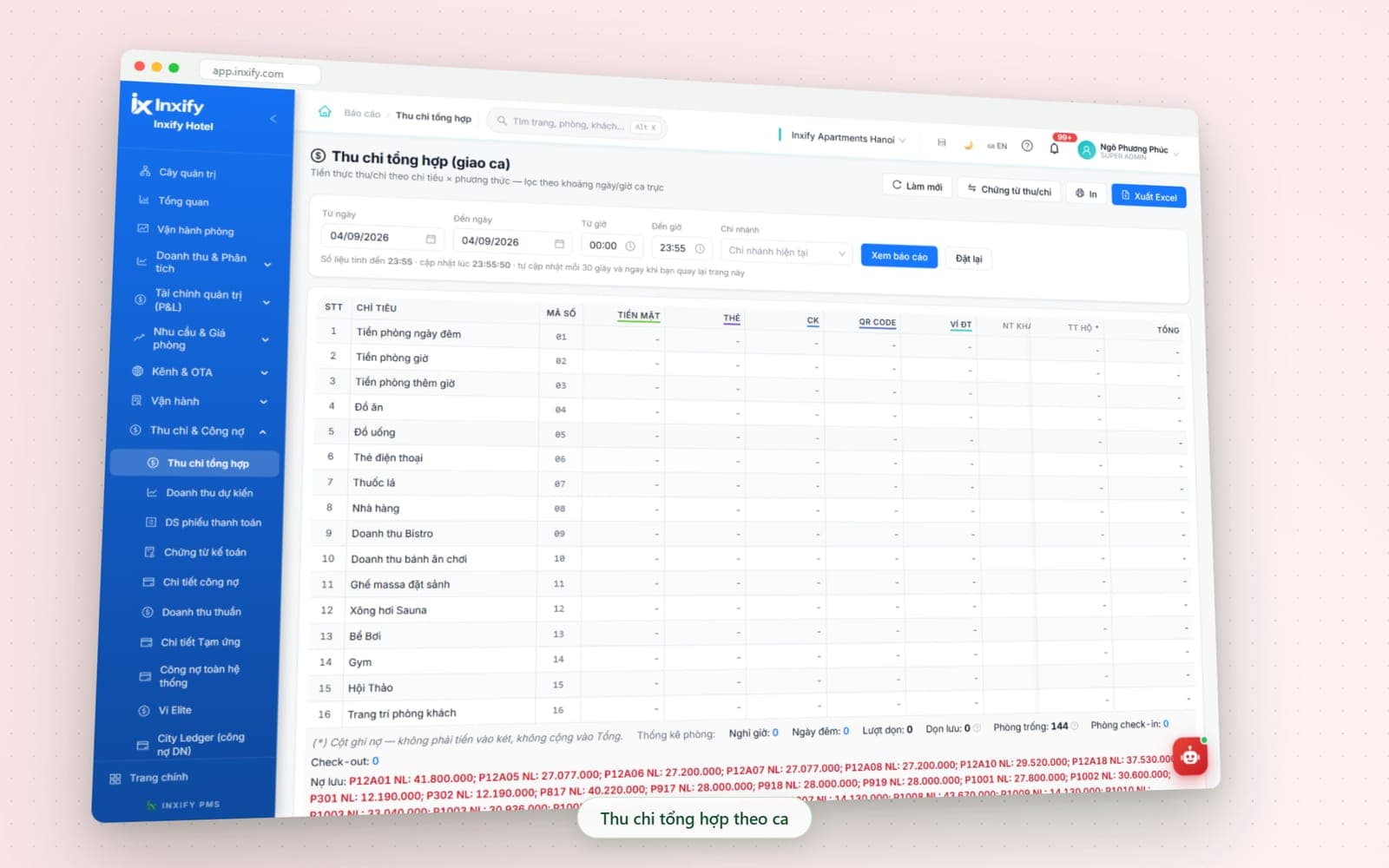
Money first: consolidated income and expenses by shift hours, vouchers, receivables, advances. On top, reports by area — net revenue, ADR and RevPAR, room operations, sales channels — and an executive overview for the owner. Every table exports to Excel.
Key features
Consolidated income & expenses (handover)
Actual money in and out by line item against each payment method, filtered to the shift hours; credit items sit in their own column, not in the drawer; in-house guest balances listed by room.
Receipts / payment vouchers & payment list
Every amount in or out has a voucher with the person who raised it; the payment list can be searched by room and by date to reconcile with the drawer and the bank statement.
Receivables & Advances
Receivables per guest and per company, system-wide receivables and advance details — know who still owes what before the guest checks out.
Net revenue, ADR & RevPAR
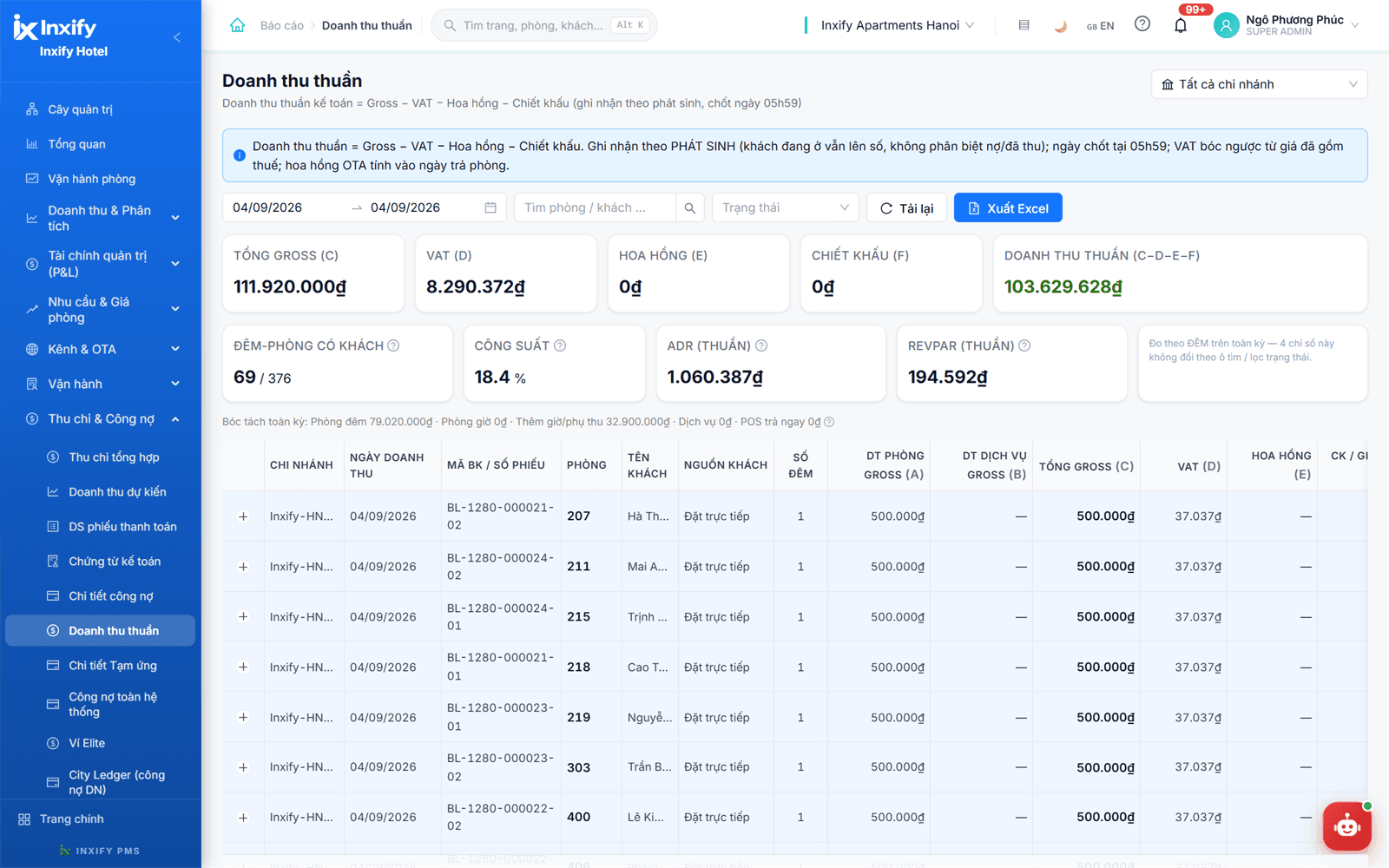
Gross takings minus VAT, commission and discounts give net revenue; occupancy, ADR and RevPAR are computed on actual room nights; below sits every transaction by room, guest source and nights.
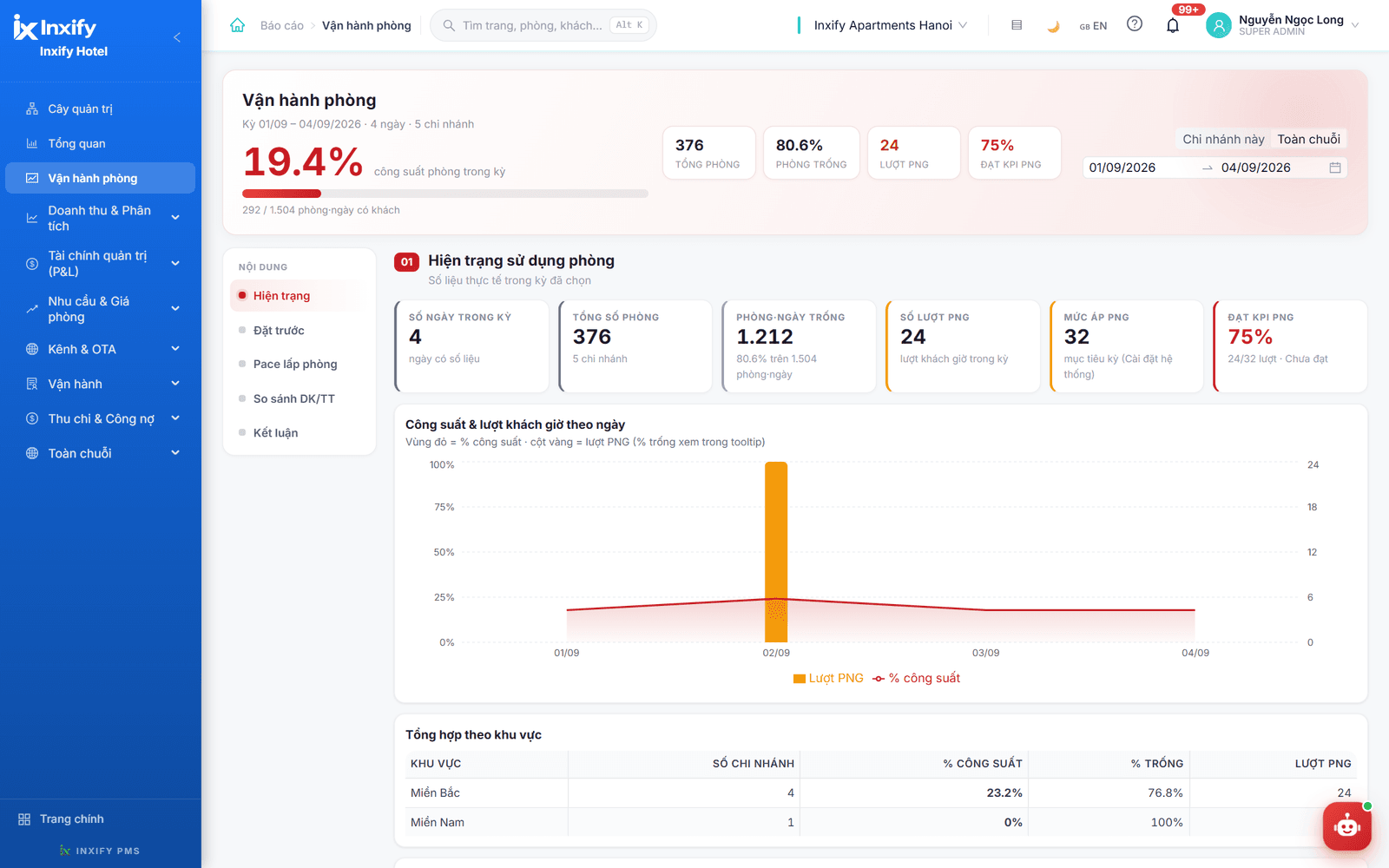
Room operations
Occupancy for the period, a chart of occupancy and hourly-stay guests by day, a toggle between this property and the whole chain, and a summary by region.
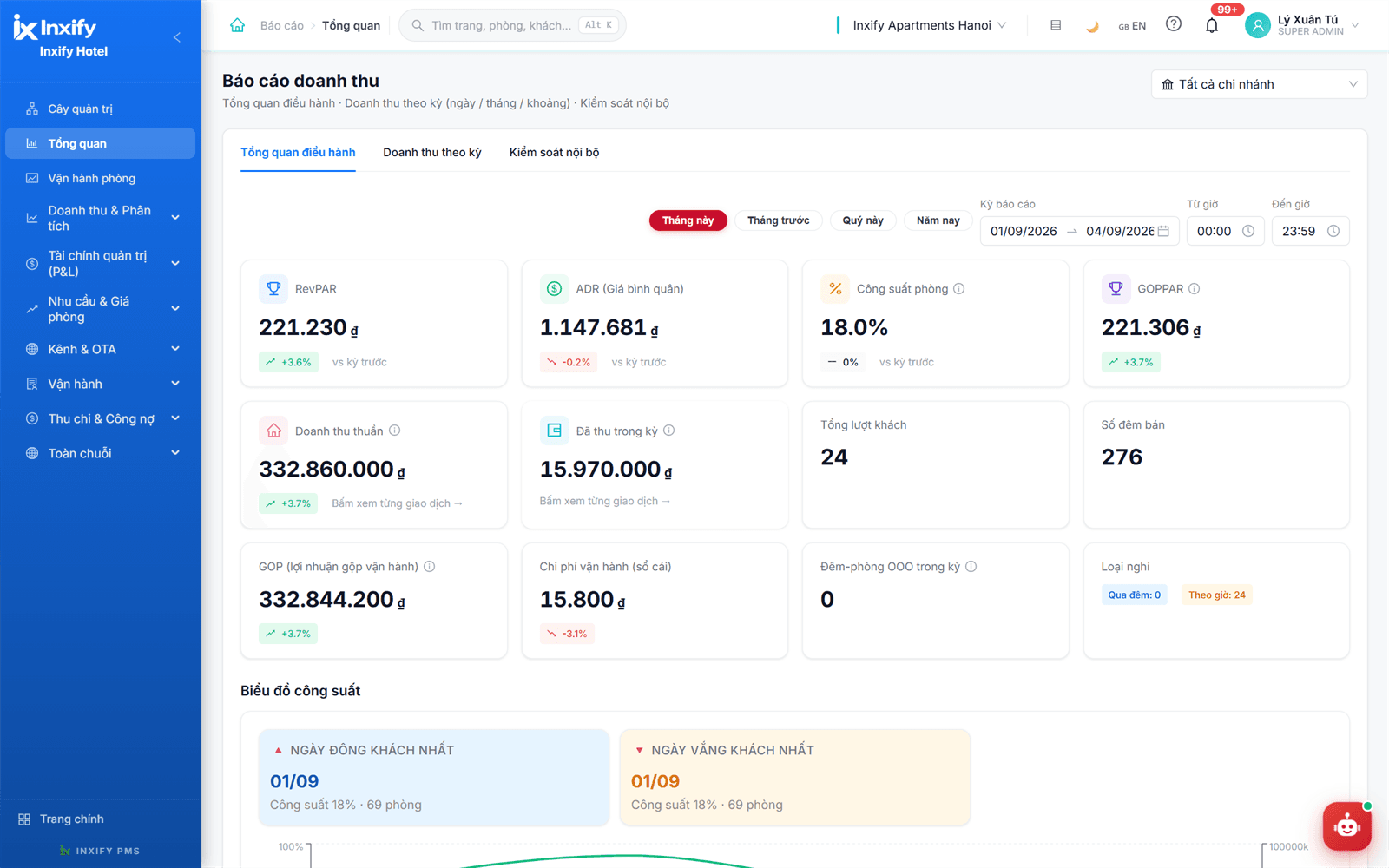
Executive overview
Net revenue, collected in period, room nights, RevPAR and ADR by month, quarter and year against the previous period; tap a figure to reach each transaction; view one property or all.
Less work
- No more adding up receipts by hand at eleven at night
- The monthly report is no longer days of retyping numbers
- Nobody has to compile a report for the owner every evening
Fewer errors
- A short drawer shows immediately which line and which shift
- A credit item is never counted as cash received
- Every figure traces back to the receipt that created it
Tailored to your hotel
Shift hours, income and expense lines, payment methods, who sees which report and the Excel export layout — the way your accountant reconciles.
The Accounting & Finance module (full bookkeeping) is developed on request for each hotel.
More screens in this group
System Administration
Who may do what, and who did what — both have an answer
Feature group · System Administration
Who may do what, and who did what — both have an answer
- User activity log
- Role-based permissions
- Several properties, one account
Errors do not only come from manual work; they come from nobody being able to check. System Administration is part of the core: permissions by role, a log of every action, several properties on one account, Cloud or On-Premise.
Key features
User activity log
Every action leaves a line: who, what, when and which record — rate changes, cancellations, invoice edits, voided receipts. When something feels off, you have facts to check instead of suspicion.
Role-based permissions
Each position sees and does only its own part of the job: rates belong to management, a saved receipt cannot simply be deleted, housekeeping sees no money — even when one person covers two roles.
Several properties, one account
Switch property right from the toolbar; pricing policy, permissions and report templates are standardised from the top down, and each property's numbers compare with the others.
Cloud or On-Premise
Choose Cloud to start right away, or On-Premise when you want the server and the data inside the hotel — the way A25 Hotel Group runs 67 properties.
Platform utilities
100% of data exports straight to reports; quick search for rooms, guests and booking codes with a keyboard shortcut; Vietnamese / English interface and a dark mode for the night shift.
Less work
- No asking around to find out who changed this number
- No re-creating permissions, rates and report templates for each property
Fewer errors
- Nobody changes a rate or voids a receipt beyond the rights they were given
- Every action leaves a trace — there is nowhere to do things quietly
Tailored to your hotel
The role chart, permissions per property, which actions need a manager's approval and the deployment model — built from your real org chart.
One day of operations
From the morning's bookings to the day's numbers in your pocket
Follow one ordinary day at the hotel to see how the feature groups connect — nobody re-enters anyone else's numbers.
Morning — bookings go on the calendar
The desk takes single and group bookings; the room changes colour on the map the moment it is saved, and the next shift sees it on opening.
Noon — guests leave, housekeeping picks up
Check-out at the desk sends the room to waiting-for-cleaning; housekeeping marks it done and the desk sells it again.
Afternoon — services to the room, stock on slips
Drinks and meals go onto the room bill as they happen; goods leaving the storeroom get a slip right then.
Evening — handover by the numbers
The cashier opens the consolidated sheet for exactly their shift hours, prints it and hands over the drawer.
Night — night audit, the owner checks in
The night audit closes the day; the owner opens a phone to the live overview, and every action of the day is already in the log.
Modules
Core modules included, add-ons when you need them
Every Inxify PMS plan includes all core modules, priced by room count. Add-on modules switch on as needed: no restaurant, no paying for POS.
Core modules · in every plan
Add-on modules · as needed
Developed on request
Cloud
Quick to set up, no infrastructure of your own — suits an independent hotel that wants to start now.
On-Premise
The server sits in your hotel and the data is entirely yours — suits a chain with several properties.
One data source
PMS is the core — everything else plugs in, nobody re-enters
Service bills, returning-guest profiles, staff shifts, guest requests from a phone — all pass through the PMS and are written to one place, with one login.
Inxify CRM
Every stay in the PMS deepens the guest profile on its own: stay history, spending, source — the base for points and looking after regulars.
See detailsInxify HR
Staff accounts and roles in the PMS link to their HR records; which shift and who served is recorded — rosters, attendance and payroll are done in Inxify HR.
See detailsVirtual Front Desk
Guests scan a QR code and send requests from their phone; the desk takes them by priority and charges them straight to the room in the PMS.
See detailsSee Inxify PMS running on your own room map
The free demo uses no sample data: we set up your exact room count, pricing rules and shifts, walk through each feature group above, then choose modules with you, pick Cloud or On-Premise and note what still needs building.