
Regular guests remembered by data, not by whoever is on shift.
One profile per guest, shared across every property — points, benefits and care by your own rules.
Inxify CRM gathers every stay, every spend and every booking source into a single guest profile that grows on its own after each visit, with nobody typing anything in. On that base, loyalty points, membership tiers, benefits and care routines are built the way you already look after regulars — not from a template.
- In the core: Guest Data module
- One guest pool shared by every property
- Updates itself from the PMS
- Points rules set per hotel
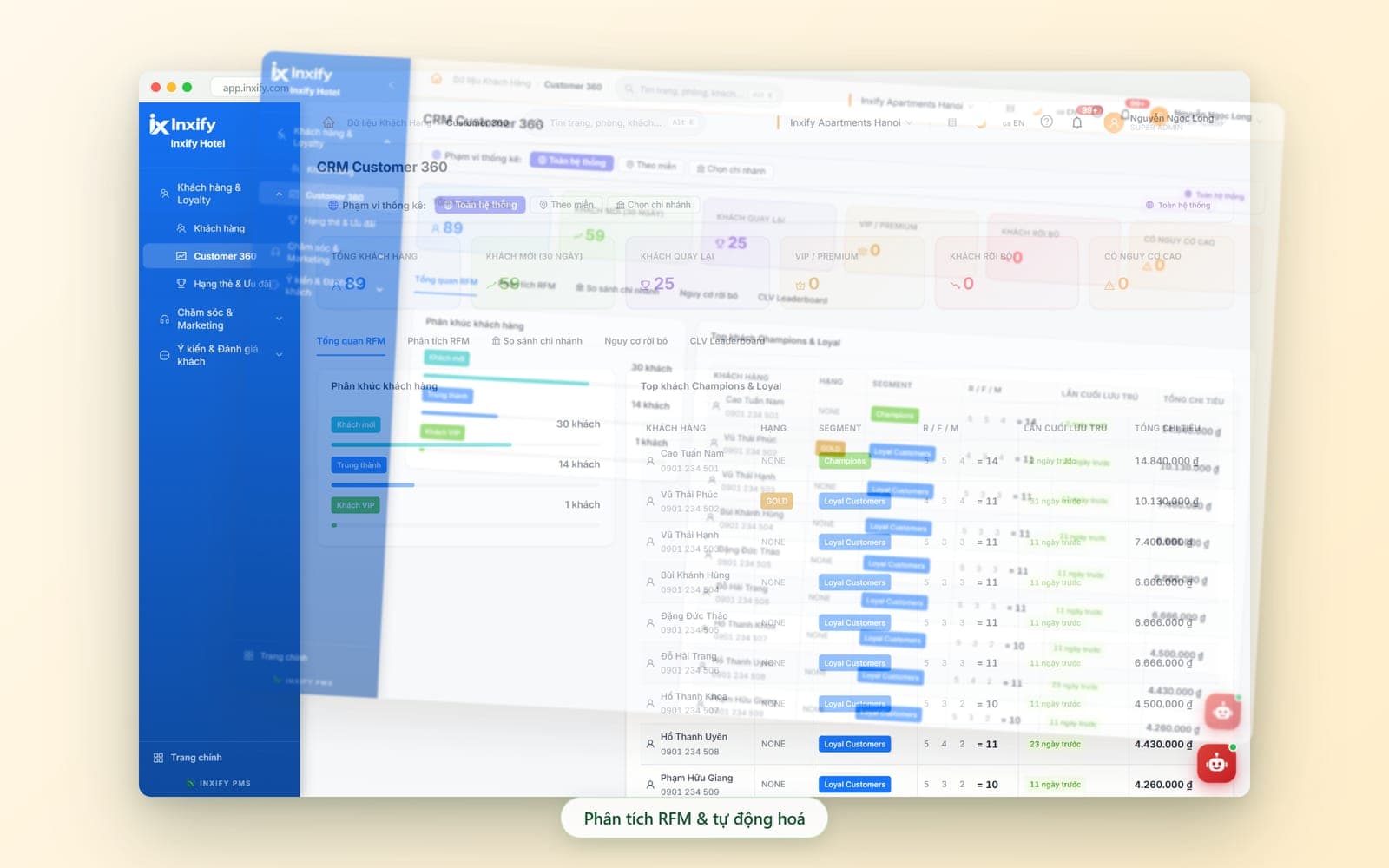
Real Inxify screenshots from a demo environment — figures shown are for illustration only. Screens are shown in Vietnamese.
Why hotels come to CRM
Guests stay again and again, and the hotel still learns nothing new
What the hotel knows about a guest lives in a notebook, in chat messages and in the head of whoever is on duty. When that person changes shift or leaves, that knowledge leaves with them.
A regular becomes a stranger
Before
Reception looks the name up in a notebook or asks from scratch; a guest on their tenth stay is welcomed like the first.
With Inxify
Type a name or phone number and see every stay, total spend and last visit — every shift welcomes them the right way.
One guest, three profiles
Before
Each property and each channel keeps its own record; the same guest shows up several times under different phone numbers.
With Inxify
One guest pool for the whole system; duplicate profiles merge with one button — each guest ends up with a single profile.
Guest leaves, nobody calls back
Before
Guests leave with no reason to return; even if you wanted to invite them back, you would not know whom to contact or when.
With Inxify
Points, tier and benefits show right on the profile; birthday lists and guests who have not returned in a while are filtered and ready for follow-up.
No idea which guests deserve priority
Before
Offers go out to everyone, costing money without knowing which guest group actually brings in revenue.
With Inxify
Guests sort themselves into new, loyal and VIP segments by frequency and spend — offers reach the right group.
Built the way you keep guests
Points, tier and benefit rules set by your hotel
A resort rewards nights, a city hotel rewards spend; a chain wants points shared across every property, an independent hotel needs a single loyalty tier. Inxify CRM does not force you into a ready-made programme: how points are earned, how many tiers there are, what each tier gets and how guests are looked after are agreed with you at rollout. Whatever is different about your loyalty programme, we build exactly that part.
Tailored to your hotel
How points are earned
Points per amount spent or per night, counted on room revenue only or on services too, with or without expiry — you choose, and the system applies it the same way on every shift.
Number of tiers and thresholds
How many tiers, what each is called, the threshold to move up and whether tiers are reviewed each period — matching the programme your hotel already runs.
Benefits per tier
Rate discounts, room upgrades when available, late check-out, transfers or a birthday gift — one set of benefits per tier, so reception sees on the profile what a guest is entitled to.
Care routines and segments
How long without a stay counts as churn risk, which group gets which offer, whether birthdays are filtered by week or by month — set the way your hotel already does it.
How points are earned
Points per amount spent or per night, counted on room revenue only or on services too, with or without expiry — you choose, and the system applies it the same way on every shift.
Example: Earn points per night so long-stay guests move up a tier faster.
Number of tiers and thresholds
How many tiers, what each is called, the threshold to move up and whether tiers are reviewed each period — matching the programme your hotel already runs.
Example: Three tiers, Silver – Gold – Diamond, reviewed once a year.
Benefits per tier
Rate discounts, room upgrades when available, late check-out, transfers or a birthday gift — one set of benefits per tier, so reception sees on the profile what a guest is entitled to.
Example: The top tier gets late check-out and an upgrade when a room is free.
Care routines and segments
How long without a stay counts as churn risk, which group gets which offer, whether birthdays are filtered by week or by month — set the way your hotel already does it.
Example: Guests long absent get a win-back offer; birthdays filtered by month to prepare gifts.
Feature groups
From a guest profile to a reason to come back
Each group below spells out which manual task goes away, which mistake is blocked, and which part is set up for your hotel.
Guests & Customer 360
One profile per guest, growing on its own after every stay
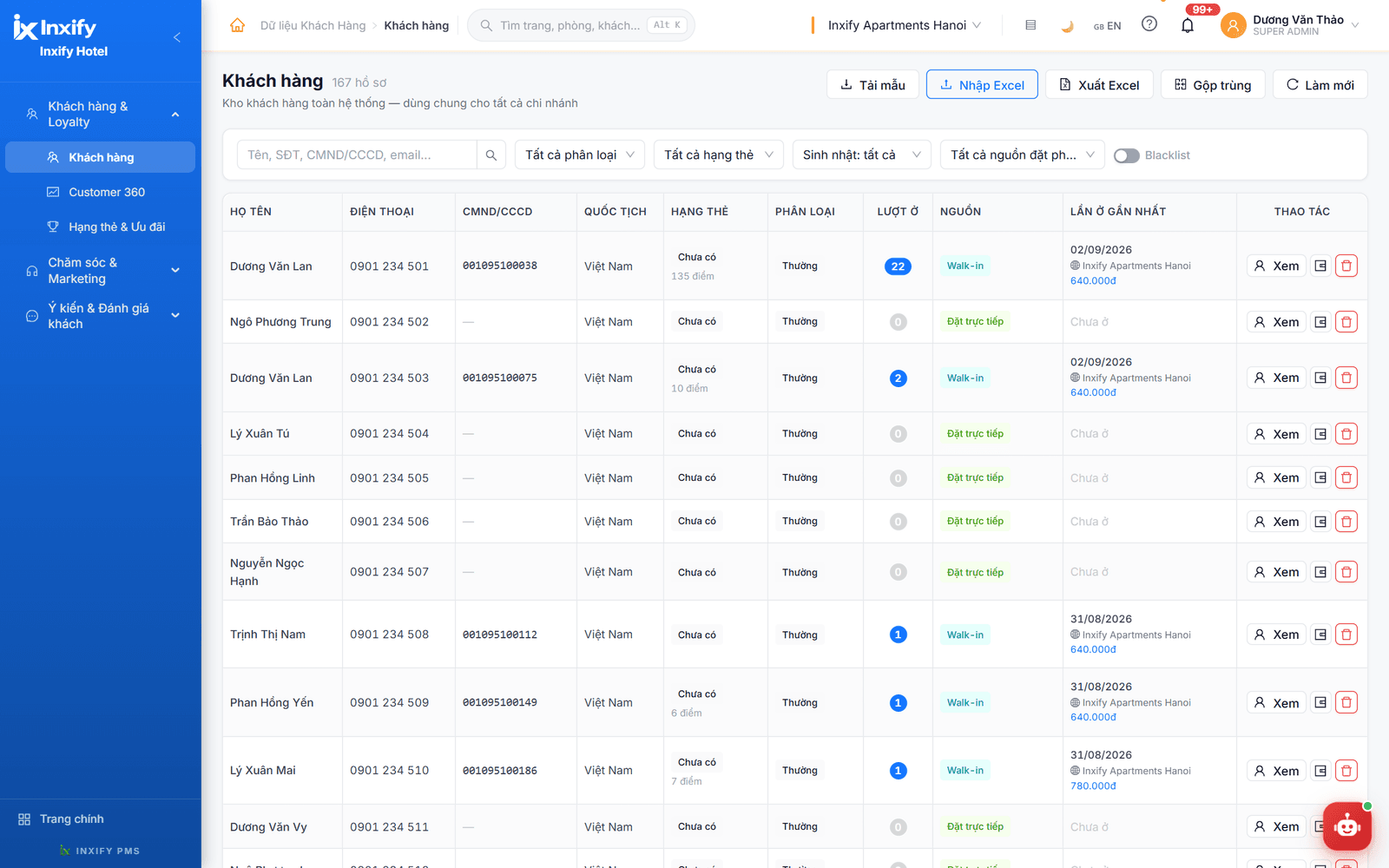
One guest pool shared by every property: each check-in in the PMS adds a stay, the spend and the booking source to the profile. Reception types a name, phone number or ID number and sees how many times this guest has stayed and where the last stay was.
Key features
System-wide guest list
Search by name, phone number, ID number or email; filter by category, tier, birthday or booking source. Each row shows the number of stays, the last stay and the property the guest just stayed at.
Updates itself from the PMS
Bookings, check-ins and invoices in the PMS flow straight into the profile — stays and spend go up without anyone re-entering them.
Merge duplicates
A guest created twice at two properties or under two phone numbers is merged with one button — no deleting by hand and typing it all again.
Customer 360
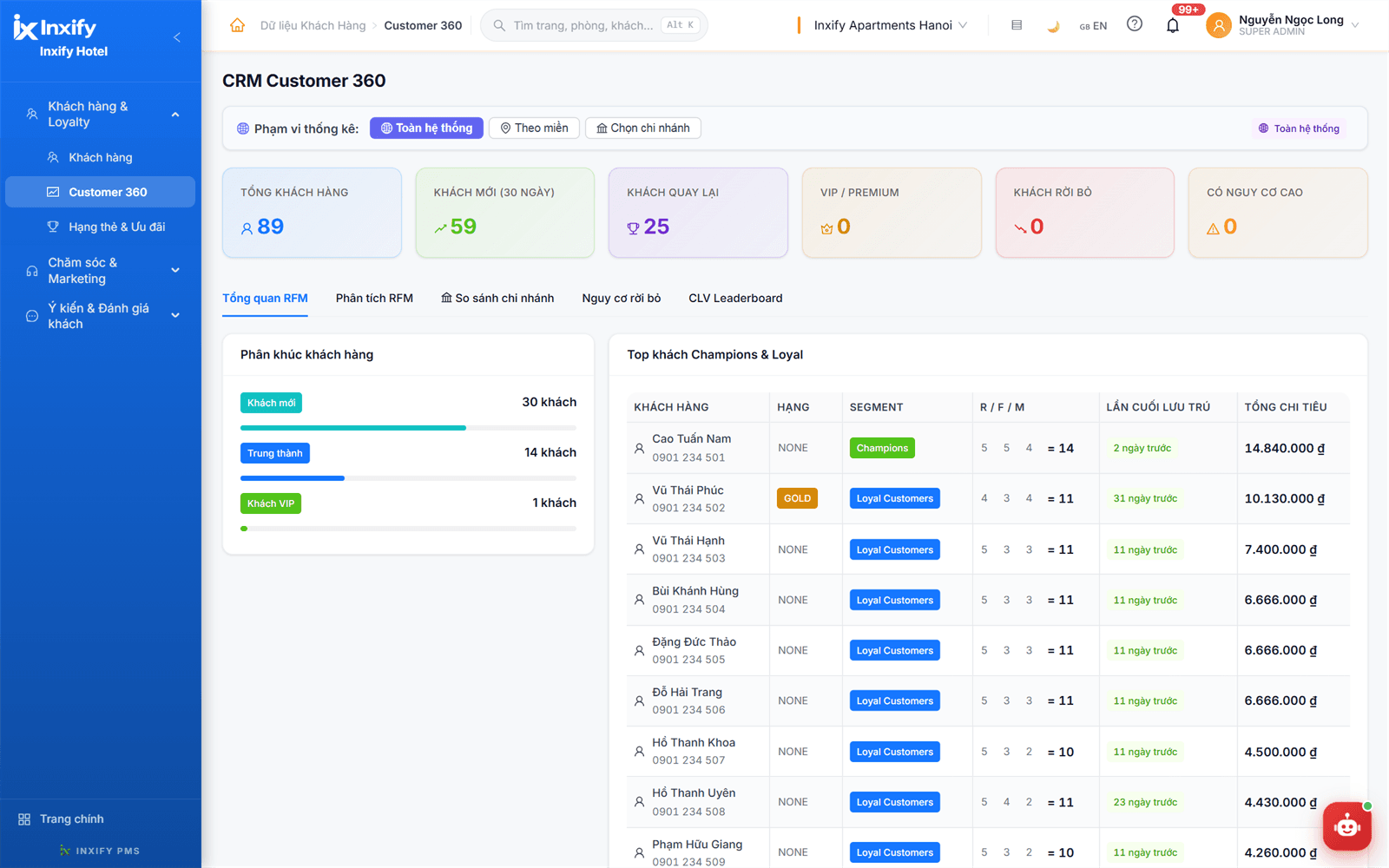
See the whole guest base on one screen: total guests, new, returning, VIP, lost guests and the high-risk group — for the whole system, by region or per property.
RFM analysis & segments
Guests sort themselves into new, loyal and VIP segments by last stay, frequency and spend; the top-guest table shows tier, segment and total spend so you know whom to look after first.
Excel import & export
Already have your guest list in a spreadsheet? Download the template, import from Excel and it is in the system; need to reconcile or share it, export to Excel straight from the list.
Less work
- No asking regulars for details already on their profile
- No typing in stays and spend after every check-out
- No more calling each property to find out where a guest has stayed
Fewer errors
- One guest is never split into several mismatched profiles
- Guest information is not lost when staff change shift or leave
- Stays and spend never differ between the CRM profile and PMS invoices
Tailored to your hotel
Guest categories, booking sources and the fields you need to store are set up the way your hotel already classifies guests.
The Guest Data module is included in every package — it is the foundation of the CRM.
More screens in this group
Tiers & Benefits
Points and benefits guests can see, and reception applies correctly
Feature group · Tiers & Benefits
Points and benefits guests can see, and reception applies correctly
- Points by spend or by night
- Membership tiers
- Benefits per tier
Points and tier show right next to the guest's name on the list. The earning rule — by spend or by night — and each tier's benefits are agreed with the hotel at rollout, so every shift applies them the same way without remembering or asking a manager.
Key features
Points by spend or by night
Points follow the rule agreed with the hotel at rollout — by spend or by night — and appear next to the tier on the guest list, no adding up by hand at month end.
Membership tiers
Guests move up a tier at the threshold the hotel sets; the tier shows on the profile and on the Customer 360 board and can be filtered straight from the guest list.
Benefits per tier
Rate discounts, upgrades when rooms are free, late check-out, birthday gifts — listed per tier, so reception opens the profile and knows what the guest is entitled to.
Less work
- No adding up points by hand or keeping paper cards for guests
- No asking a manager what this guest is entitled to
Fewer errors
- Points and tiers never differ between shifts because one rule applies
- Benefits are not applied to the wrong tier because they are written on the profile
Tailored to your hotel
How points are earned, the number of tiers, their names, thresholds and per-tier benefits all follow your hotel's programme; more complex rules are developed separately.
Tier and points are shown on the guest profile out of the box; custom earning rules, thresholds and benefits belong to advanced CRM — developed on request for each hotel.
Care & Marketing
Look after guests after check-out, not when they remember you
Feature group · Care & Marketing
Look after guests after check-out, not when they remember you
- Birthday filter
- After-stay care
- Offers by segment
Guests with a birthday this month, guests long absent, guests who just checked out — filtered straight from stay data. The care team knows whom to call and what to send, and records the guest's feedback right on the profile.
Key features
Birthday filter
Filter guests by birthday right on the list to send wishes or an offer on the day — no flipping through profiles one by one.
After-stay care
Guests who just checked out are filtered from stay data so you can thank them, ask for feedback or invite them back — no digging through the check-in log.
Offers by segment
Pick new, loyal, VIP or at-risk guests from Customer 360 as the list for an offer — the right group, not a blanket send.
Feedback & guest reviews
Feedback guests send in and reviews from booking channels are gathered in one place to track and handle; a complaint becomes a support ticket that is followed through to the end.
Churn risk
The churn-risk tab in Customer 360 lists guests long absent, by the threshold agreed with the hotel at rollout — reach out before they are gone for good.
Less work
- No notebook or spreadsheet to find birthday guests or long-absent guests
- No building an offer list by hand for every campaign
Fewer errors
- No regular is missed because the care list comes straight from stay data
- No complaint is forgotten because a ticket is tracking it
Tailored to your hotel
The churn-risk threshold, which group gets which offer, greeting templates and care scripts are set the way your hotel already does it.
Automated campaigns and connections to external messaging channels are developed on request.
From a stay to a returning guest
How a guest moves through Inxify CRM
Nobody enters anything extra — each step takes its data from the one before.
Check-in — the profile records itself
Reception checks the guest in on the PMS; the CRM adds the stay, property and booking source to the guest profile.
Check-out — points and tier update
Once the invoice is closed, the stay and spend land on the profile; points and tier update by the rule agreed with the hotel.
Segment — guests sort themselves
By last stay, frequency and spend, the guest lands in the new, loyal or VIP group on Customer 360.
Care — right person, right time
Birthdays, long absences, fresh check-outs — the care team opens the ready-filtered list and gets in touch.
Return — welcomed the right way
The guest comes back; the new shift types the phone number and sees tier, benefits and service notes from last time.
Module scope
In the core already, extended when you need more depth
Guest Data is one of the core modules in every package; automation, campaigns and custom points-and-tier rules are built around each hotel's own programme.
Included in the core
Developed on request
One data source
The CRM reads bookings and invoices straight from the PMS — no sync step and no re-entry between the two modules.
Guest data in your hands
Choose On-Premise and guest profiles stay entirely on the hotel's own server; choose Cloud and start right away with no infrastructure of your own.
Works with the other products
CRM does not stand alone — guest data comes from every touchpoint
Each Inxify product adds a layer of information to the same guest profile.
Inxify PMS
Every booking, check-in and invoice in the PMS feeds the guest profile — the CRM has no separate data entry step.
See detailsVirtual Front Desk
Dishes ordered and cars booked through Virtual Front Desk are saved on the profile as habits, so next time service matches the guest's taste.
See detailsInxify HR
HR records the shift and the staff on duty, so when a guest praises or complains, you know which shift served them.
See detailsShow us the loyalty programme your hotel runs today
The free demo runs Inxify CRM on your own guest list and offer programme — from there we agree the points rule, the tiers and whatever needs building just for you.